In this article
This Tripo AI review is for game developers, 3D printers and designers deciding whether to pay for Tripo in 2026. Tripo AI generates 3D models from text prompts or images, and users rate it highly. The details that matter most are what a model really costs in credits, and who owns what you create on each plan.
A fast, well-liked image-to-3D tool with clear credit costs and reasonable paid prices. Avoid the free plan for anything you care about: Tripo keeps the rights to free users’ inputs and outputs. Refunds are narrow.
- Best for
- Game developers, 3D printing hobbyists and designers who need quick base meshes
- Price
- Free; Pro $20 and Max $90 a month billed annually; Team from $55 a seat
- Cost per model
- About $0.10 to $0.27 on Pro, depending on settings (our calculation)
- Free plan
- 200 credits a month, public models, non-commercial use only
- Refunds
- Accidental purchases within 24 hours if no credits used
- Company
- Holymolly Limited, headquartered in Hong Kong
How we reviewed: We did not accept payment for this review, and it contains no affiliate links. On 16 October 2026 we read Tripo’s pricing page (including its credit table and FAQ), terms of use (last updated 11 July 2025) and privacy policy (effective 30 September 2026), captured the pricing page, and checked Trustpilot. We did not generate models with a paid plan, so we have not judged output quality ourselves.
What is Tripo AI?
Tripo AI is an AI 3D generator run by Holymolly Limited, which says it is headquartered in Hong Kong. You type a prompt or upload a picture and it produces a textured 3D model. Paid plans add retopology (cleaner mesh structure), segmentation into parts, auto-rigging for animation, 8K textures and plugins for Blender, Unity, Unreal and other 3D software.
Tripo AI pricing in 2026
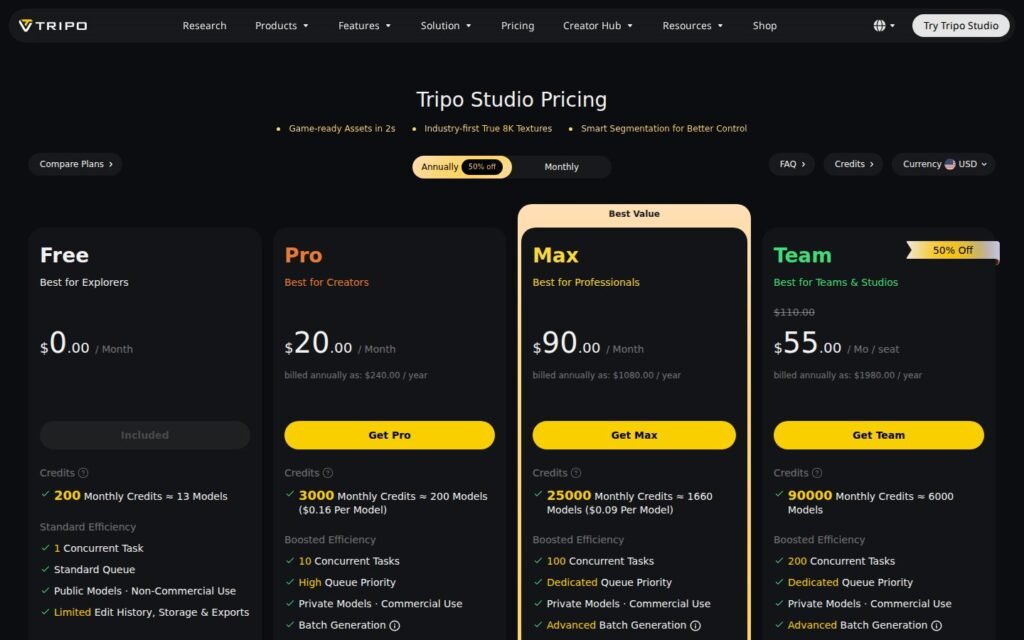
| Plan | Price | Credits a month | Rights |
|---|---|---|---|
| Free | $0 | 200 (about 13 models) | Public models, non-commercial use |
| Pro | $20/month ($240 billed yearly) | 3,000 (about 200 models) | Private models, commercial use |
| Max | $90/month ($1,080 billed yearly) | 25,000 (about 1,660 models) | Private models, commercial use |
| Team | $55/seat/month yearly; $110/seat monthly | 90,000 | Private models, commercial use, shared workspace |
Extra credits cost $10 for 1,000, $100 for 12,000, $500 for 62,000 and $1,000 for 130,000.
What a 3D model really costs
Tripo publishes the credits each action uses. A standard HD model costs 15 credits; options add more.
| What you make | Credits | Cost on Pro | Cost with $10 credit packs |
|---|---|---|---|
| Basic HD model | 15 | $0.10 | $0.15 |
| HD model + Ultra quality + HD texture | 40 | $0.27 | $0.40 |
| Smart Mesh model | 35 | $0.23 | $0.35 |
| Basic model + auto-rig | 35 | $0.23 | $0.35 |
Tripo’s own page quotes “$0.16 per model” on Pro and “$0.09” on Max, which does not match a simple division of price by its own model estimates ($0.10 and $0.05). Treat all per-model figures as estimates that depend on your settings and retries.
AI credit cost calculator
Credits are only cheap if you use them. Enter your plan and how many models you need to see your real cost per model. The defaults use Tripo Pro and 100 basic models a month.
Turn an AI tool’s credits into a real cost per image, model, clip or minute, based on how much you actually use.
Most plans do not roll unused credits over, so the cost per output you actually pay rises when you use less than the allowance.
Want to come back to it later? Bookmark our standalone AI credit cost calculator, or browse all our free calculators.
Who owns your models? Read this before using the free plan
Tripo’s terms of use treat free and paid users very differently:
- Free users: Tripo “retains all rights” to the inputs and outputs, including rights to use, license and earn money from them. Do not upload your own artwork or client work on the free plan.
- Paid users: you “generally have all rights” to your inputs and outputs, while Tripo keeps a free, permanent licence to use and display them as needed to run the service.
- Training: the terms say Tripo will not use inputs and outputs to train its AI. Its privacy policy adds that it may use aggregated or anonymised data, including prompts and outputs, to improve its models.
The privacy policy says Tripo does not use personal information to train models and does not sell personal information for money. The terms are governed by Hong Kong law.
Refunds and cancellation
Tripo’s FAQ says refunds are available for accidental purchases if you ask within 24 hours and have not used any credits. Its terms state that fees are otherwise non-refundable. You cancel from the Membership tab in your account.
What users say
On Trustpilot, Tripo had a TrustScore of 4.5 out of 5 from 621 reviews when we checked, with 83% five-star and 9% one-star ratings. Users praise ease of use and model quality from photos; the one-star reviews focus on billing, auto-renewals, credits that do not roll over and refusals of refunds.
What we like
- Fast text-to-3D and image-to-3D
- Published credit costs per action
- Commercial rights on all paid plans
- Plugins for major 3D tools
- Strong user ratings
What to watch
- Free plan gives Tripo the rights to your work
- Free models are public and non-commercial
- Refunds only within 24 hours and before any use
- Advertised per-model prices are hard to reconcile
- Unused monthly credits do not roll over
Tripo AI alternatives
| Tool | Best for | Official site |
|---|---|---|
| Meshy | Text and image to 3D with texturing | meshy.ai |
| Rodin (Hyper3D) | High-detail models for production | hyper3d.ai |
| Luma AI | Capturing real objects and scenes in 3D | lumalabs.ai |
| Sloyd | Parametric game-ready assets | sloyd.ai |
| 3D AI Studio | Several 3D models in one subscription | 3daistudio.com |
For AI video tools, read our Higgsfield AI review and our A2E AI review.
Frequently asked questions
How much does Tripo AI cost?
There is a free plan. Pro costs $20 a month and Max $90 a month billed annually; Team starts at $55 a seat a month billed yearly.
Is Tripo AI free?
Yes, with 200 credits a month, about 13 models. Free models are public, for non-commercial use, and Tripo retains the rights to them.
Can I use Tripo AI models commercially?
Yes on paid plans, which include commercial use. The free plan is non-commercial.
Does Tripo AI give refunds?
Only for accidental purchases if you ask within 24 hours and have not used any credits, according to its FAQ.
Tripo AI vs Meshy: which is better?
Both turn images and text into 3D. Compare the cost per model and rights on each before deciding; test the same prompt in both free plans first, but remember Tripo’s free-plan rights terms.
Browse more reviews in our AI Tools section.