In this article
This Suno AI review is for anyone deciding whether to pay for Suno in 2026. Suno can turn a short text prompt into a full song with vocals in seconds, and it is still one of the best tools of its kind. But its plans changed sharply this year, and the limits now matter more than the features.
Excellent music quality and the clearest commercial rights in AI music on paid plans. But download caps, expiring credits, no refunds and poor user ratings make it a tool to rent for a project, not a subscription to forget about.
- Best for
- Songwriters, creators and video makers who need a few finished tracks a month
- Price
- Free; Pro $8 a month and Premier $24 a month, billed annually
- Free use
- 50 credits a day, but no song downloads and no commercial rights
- Downloads
- 20 a month on Pro, 60 on Premier
- Refunds
- Payments are final and non-refundable, except where the law requires
- Company
- Suno, Inc., Cambridge, Massachusetts
How we reviewed: We did not accept payment or free credits for this review, and it contains no affiliate links. On 14 October 2026 we read Suno’s pricing page, terms of service (revised 10 August 2026) and help centre in full, captured the pricing page, and checked independent user feedback on Trustpilot. We did not test paid features hands-on. Prices and limits change often, so check the official pricing page before you buy.
What is Suno?
Suno is an AI music generator made by Suno, Inc., based in Cambridge, Massachusetts. You describe a song, or paste your own lyrics, and it produces a complete track with vocals and instruments. Paid plans add editing tools, stem separation (splitting a song into vocals, drums and so on), custom models trained on your own music, and Suno Studio, a fuller music workstation on the top plan.
The big 2026 change: licensed models and download caps
In November 2025, Suno settled a copyright lawsuit with Warner Music Group. As SiliconANGLE reported, the deal introduced new “fully licensed” models and new download restrictions: only paying subscribers can download songs, and even they face caps.
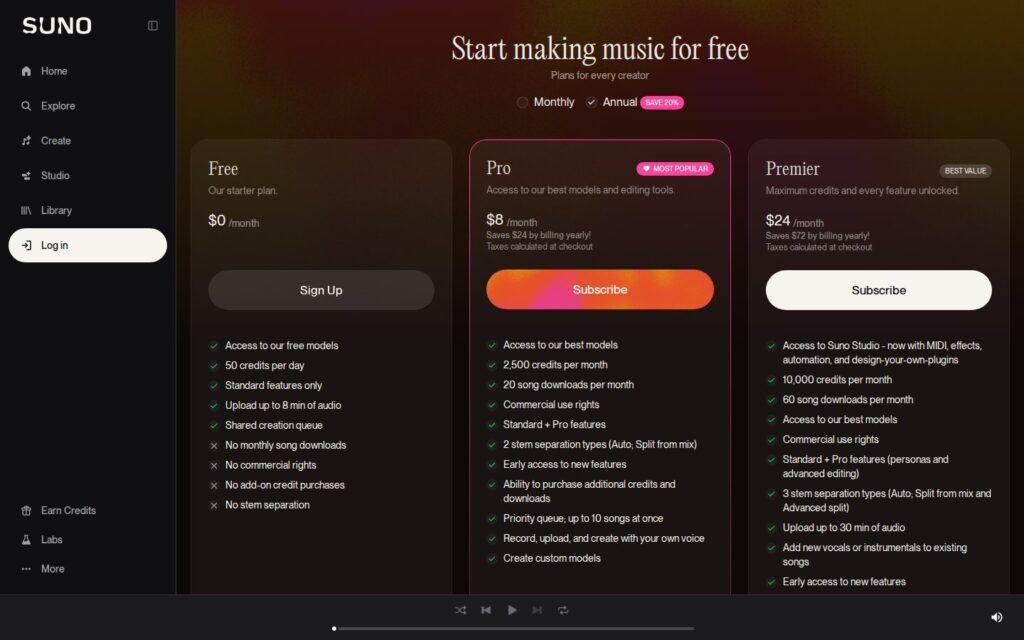
Suno’s pricing page now shows exactly that. Free users get 50 credits a day but “No monthly song downloads”. Pro includes 20 song downloads a month and Premier 60. Extra downloads and credits can be bought on paid plans.
Suno pricing in 2026
| Plan | Annual billing | Credits | Song downloads | Commercial rights |
|---|---|---|---|---|
| Free | $0 | 50 a day | None | No |
| Pro | $8 a month (saves $24 a year vs monthly) | 2,500 a month | 20 a month | Yes |
| Premier | $24 a month (saves $72 a year vs monthly) | 10,000 a month | 60 a month | Yes |
What does a song actually cost?
Suno’s help centre says the free plan’s 50 daily credits are enough to make 10 songs, so a song costs about 5 credits. That gives this picture:
| Plan (annual billing) | Songs you can generate | Songs you can download | Cost per downloaded song |
|---|---|---|---|
| Pro, $96 a year | about 500 a month | 20 a month | about $0.40 |
| Premier, $288 a year | about 2,000 a month | 60 a month | about $0.40 |
The download cap, not the credits, is now the real limit. You can generate hundreds of songs, but only keep a small number as files. If you only stream and share songs inside Suno, that may not matter. If you need audio files for videos, podcasts or releases, it matters a lot.
Who owns the songs?
Suno’s terms of service are clear on tiers. For Pro and Premier subscribers, Suno “assigns to you all of its right, title and interest” in the songs you generate. Free users may only use songs for “lawful, personal and non-commercial purposes”.
Two important caveats. First, Suno says that “due to the nature of machine learning” it cannot promise that any copyright will exist in a song at all. Second, the terms allow Suno to use what you upload, including your voice recordings, to train and improve its models.
Refunds and cancellation
- Payments are “final and non-refundable, unless otherwise determined by Suno”, though statutory rights still apply.
- Subscriptions renew automatically. Cancel in your account settings, or by emailing billing@suno.com, before the renewal date.
- Credits in subscriptions do not roll over from day to day or month to month. Purchased top-up credits do not expire, but need an active subscription to use.
What users say
On Trustpilot, Suno had a TrustScore of 1.7 out of 5 from 187 reviews when we checked, with 72% one-star ratings. The profile is unclaimed and Suno has not invited reviews, so the sample may not be representative. Common complaints were billing and cancellation problems, slow support, and the new 20-download monthly cap; some praised the music quality and creative possibilities.
What we like
- Among the most convincing AI songs with vocals
- Clear ownership assignment on paid plans
- Licensed models after the Warner Music deal
- Generous generation credits on paid plans
- Stems, custom models and Studio on higher tiers
What to watch
- Free plan cannot download songs at all
- Paid plans capped at 20 or 60 downloads a month
- Credits expire and payments are non-refundable
- May train on your uploads, including your voice
- Very poor Trustpilot rating
Who should use Suno?
- Good fit: creators who need a handful of finished tracks a month, songwriters sketching ideas, and anyone who mostly shares songs inside Suno.
- Poor fit: anyone who needs dozens of downloadable tracks a month, or who wants guaranteed copyright protection for commercial releases.
Our tip: subscribe for one month when you have a specific project, download your best tracks, and cancel before renewal.
Suno alternatives
| Tool | Best for | Official site |
|---|---|---|
| Udio | AI songs with vocals; also settled with Warner Music | udio.com |
| ElevenLabs Music | Music from a company best known for AI voices | elevenlabs.io |
| Mureka | AI songs with lyric and melody control | mureka.ai |
| Stable Audio | Instrumentals and sound design | stableaudio.com |
| Soundraw | Royalty-free background music for videos | soundraw.io |
For other creative AI tools, read our Higgsfield AI review and A2E AI review. And before relying on any AI tool for work, see what large language models can and cannot do.
Frequently asked questions
Is Suno free?
Yes, Suno has a free plan with 50 credits a day, about 10 songs. But free users cannot download songs and cannot use them commercially.
How many songs can I download on Suno?
Pro includes 20 song downloads a month and Premier 60. Extra downloads can be bought on paid plans.
Do I own the songs I make with Suno?
On Pro and Premier, Suno assigns its rights in your songs to you. On the free plan, you may only use them personally and non-commercially. Suno does not guarantee copyright exists in AI songs.
Can I get a refund from Suno?
Suno’s terms say payments are final and non-refundable unless Suno decides otherwise or the law requires a refund.
What are the main Suno complaints?
On Trustpilot, users most often mention billing and cancellation problems, slow support and the new monthly download cap.
Browse more reviews in our AI Tools section.