
In this article
This Notion AI review answers the question most teams now face: is it worth upgrading to Notion’s Business plan to get AI? Free and Plus users only get a limited trial of Notion AI. Full access to Notion’s AI agent, meeting notes and Enterprise Search comes with Business, which costs twice as much as Plus.
Genuinely useful if your team already lives in Notion: it searches, writes and summarises across your own pages, and Notion’s data-use promises are clear. But AI is now bundled into a pricier plan, premium models and agents cost extra credits, and user ratings for Notion overall are poor.
- Best for
- Teams that already keep their docs, wikis and projects in Notion
- Price
- Business $20 a member a month billed yearly, $24 monthly
- Extra cost of AI
- About $10 a member a month over Plus (yearly)
- Free and Plus
- A limited number of complimentary AI responses
- Refunds
- Within 3 days of a monthly invoice or 30 days of an annual one
- Company
- Notion Labs, Inc.
How we reviewed: We did not accept payment for this review, and it contains no affiliate links. On 16 October 2026 we read Notion’s pricing page, its Notion AI help pages, AI security and privacy practices, Notion credits and refund policies, captured the pricing page, and checked Trustpilot. We did not test Notion AI on a paid workspace for this review.
What is Notion AI?
Notion AI is the assistant built into Notion, the workspace app for notes, docs, wikis and project databases. It can chat, write and edit, autofill database fields, translate, transcribe and summarise meetings, and search across Notion and connected apps. Notion says it uses models it hosts and models from providers such as Anthropic and OpenAI.
Notion AI pricing in 2026
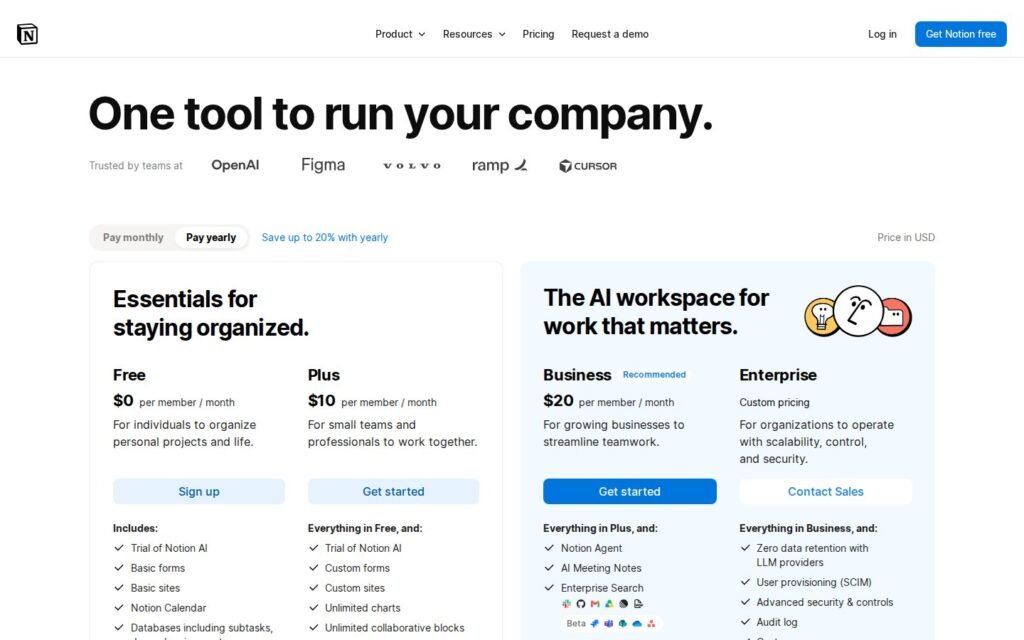
| Plan | Yearly billing | Monthly billing | Notion AI |
|---|---|---|---|
| Free | $0 | $0 | Limited trial |
| Plus | $10/member/month | $12/member/month | Limited trial |
| Business | $20/member/month | $24/member/month | Notion Agent, AI Meeting Notes, Enterprise Search |
| Enterprise | Custom | Custom | Everything in Business plus zero data retention with AI providers |
The real cost of AI per person
Because full AI needs Business, the cost of Notion AI is the gap between Plus and Business: $10 a member a month on yearly billing, or $12 on monthly billing.
| Team size | Plus per year | Business per year | Extra paid for AI |
|---|---|---|---|
| 1 person | $120 | $240 | $120 |
| 5 people | $600 | $1,200 | $600 |
| 10 people | $1,200 | $2,400 | $1,200 |
| 25 people | $3,000 | $6,000 | $3,000 |
On top of that, Notion credits are an add-on for Business and Enterprise. They pay for Custom Agents, premium AI models and AI use beyond the included allowance: $10 per 1,000 monthly credits or $13 per 1,000 annual credits. Unused credits do not carry over.
To turn any AI tool’s credits into a cost per task, try our AI credit cost calculator.
What happens to your data
Notion’s AI security practices page makes three clear promises:
- By default, Notion and its AI subprocessors do not use customer data to train any models, and contracts with AI providers prohibit it.
- For non-Enterprise workspaces, AI providers keep customer data for 30 days or fewer before deletion; Enterprise workspaces get zero data retention.
- Workspace content is turned into embeddings (a numerical index) for search, which are deleted within 60 days of a page or workspace being deleted.
Its AI help pages also say that thumbs-up and thumbs-down feedback is not used to train Notion AI. During beta, image generation is limited to 10 images or edits per 24 hours and 30 per 30 days.
Refunds
Notion’s refund policy is fairer than most AI tools: in most cases it can refund within three days of a monthly invoice or 30 days of an annual invoice, and unused purchased credits can be refunded. Requests must come from the workspace owner or billing email.
What users say
On Trustpilot, Notion had a TrustScore of 2.2 out of 5 from 439 reviews when we checked, with 44% one-star and 32% five-star ratings. The profile is claimed. Complaints focus on pricing, cancellation and slow support; a few mention AI credits running out quickly. Users praise flexibility and the clean interface.
What we like
- Works across your own Notion pages and connected apps
- Clear no-training promise for customer data
- Short AI-provider data retention, zero on Enterprise
- Fairer refund window than most tools
- Meeting notes and search in one place
What to watch
- Full AI requires the Business plan
- About $10 extra per member a month for AI
- Premium models and agents cost extra credits
- Unused credits do not roll over
- Poor overall user ratings for Notion
Who should use Notion AI?
- Good fit: teams already running their wiki, docs and projects in Notion, where AI search across everything saves real time.
- Think twice: individuals and small Plus teams who mainly want a writing assistant; a standalone chatbot may cost less.
- Check first: regulated businesses should read the data-retention terms and consider Enterprise.
Notion AI alternatives
| Tool | Best for | Official site |
|---|---|---|
| ClickUp Brain | AI inside a project management tool | clickup.com |
| Coda | Docs that work like apps, with AI | coda.io |
| Microsoft 365 Copilot | Teams already using Word, Outlook and Teams | microsoft.com |
| Gemini in Google Workspace | Teams using Google Docs and Gmail | workspace.google.com |
| Mem | AI-first personal notes | mem.ai |
For AI writing tools, see our QuillBot review, and for checking AI text, our GPTZero review.
Frequently asked questions
How much is Notion AI?
Full Notion AI comes with the Business plan at $20 a member a month billed yearly, or $24 monthly. Free and Plus plans get a limited trial.
Is Notion AI free?
Only as a limited trial. Free and Plus users get a limited number of complimentary AI responses.
Does Notion AI train on my data?
Notion says that by default neither it nor its AI providers use customer data to train models, and its contracts with providers prohibit it.
Is Notion AI worth it?
It can be for teams that keep most of their work in Notion. For individuals who mainly want writing help, a cheaper standalone assistant may be enough.
Notion AI vs ChatGPT: what is the difference?
Notion AI works inside your Notion workspace and can search and edit your own pages. A general chatbot does not see your workspace unless you paste content in.
Browse more reviews in our AI Tools section.