Artificial Intelligence is changing cybersecurity faster than most people realize.
For years, penetration testers manually chained together tools like:
- Nmap
- Nuclei
- SQLMap
- Subfinder
- Amass
- Burp Suite
But now a new generation of AI-powered security platforms is emerging.
Instead of manually deciding which tool to run next, AI agents can analyze targets, choose tools, automate workflows, and assist researchers during penetration tests.
One of the most interesting projects in this space is:
👉 https://github.com/0x4m4/hexstrike-ai
HexStrike AI combines AI agents, offensive security tools, and Model Context Protocol (MCP) integration into a single cybersecurity automation platform. According to the project documentation, it supports 150+ security tools and multiple AI agents for reconnaissance, vulnerability assessment, bug bounty workflows, and security research.
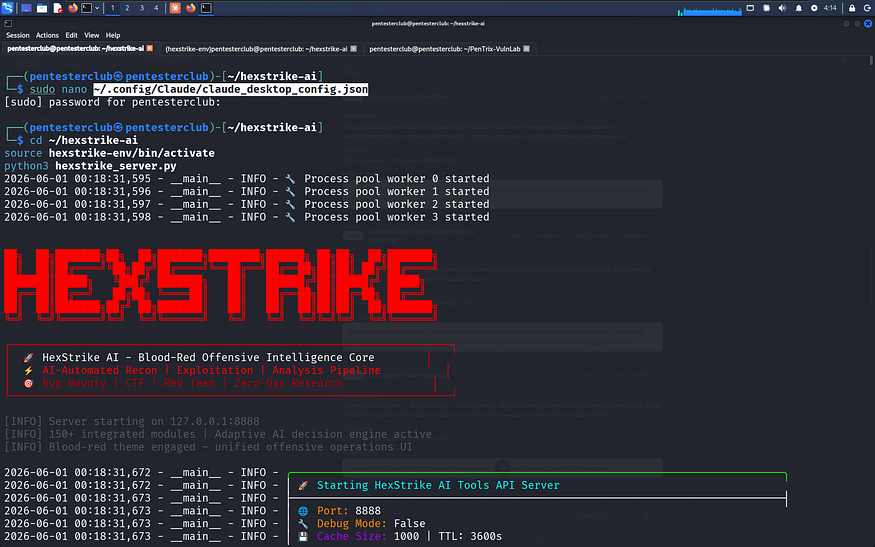
In this article we’ll explore:
- What HexStrike AI is
- Why MCP is changing cybersecurity automation
- How Claude Code connects to security tools
- How to install HexStrike AI
- How to configure MCP servers
- Why AI-assisted penetration testing is becoming the future
The Problem With Traditional Pentesting
A modern penetration tester may use:
- 20+ reconnaissance tools
- Multiple vulnerability scanners
- Manual command execution
- Separate reporting platforms
- Browser-based research
- Cloud infrastructure
The workflow becomes fragmented.
A typical assessment often looks like:
Recon → Enumeration → Scanning → Validation → Exploitation → Reporting
Every stage requires switching tools.
The biggest bottleneck isn’t finding tools.
It’s orchestrating them efficiently.
What Is HexStrike AI?
HexStrike AI is an AI-powered MCP cybersecurity platform designed to connect AI agents with offensive security tools.
Instead of treating AI like a chatbot, HexStrike AI treats AI as an operational assistant capable of interacting with security tooling. The project describes itself as an MCP server that enables AI agents such as Claude, GPT, Copilot, and others to run 150+ cybersecurity tools through structured workflows.
https://cdn.embedly.com/widgets/media.html?url=https%3A%2F%2Fwww.youtube.com%2Fwatch%3Fv%3DtaPT9-ULjnw&type=text%2Fhtml&schema=google&display_name=YouTube&src=https%3A%2F%2Fwww.youtube.com%2Fembed%2FtaPT9-ULjnw
Supported capabilities include:
- Reconnaissance
- Vulnerability scanning
- OSINT
- Network analysis
- Forensics
- Bug bounty automation
- Reporting workflows
What Is MCP?
MCP stands for:
Model Context Protocol
It is an emerging standard that allows AI systems to connect with external tools and services.
Think of MCP as:
USB-C for AI tools.
Instead of every AI application building custom integrations, MCP provides a standard way for AI agents to interact with:
- Security tools
- Databases
- APIs
- Filesystems
- Browsers
- Development environments
Recent research describes MCP as becoming one of the major standards for connecting AI agents to external capabilities and tool ecosystems.
Why Claude Code Changes Everything
Claude Code introduced a major shift in how AI agents interact with technical workflows.
Instead of only answering questions, Claude Code can:
- Execute commands
- Read files
- Modify code
- Work with repositories
- Connect to MCP servers
Research analyzing Claude Code describes it as an agentic system capable of tool usage, command execution, and external integrations.
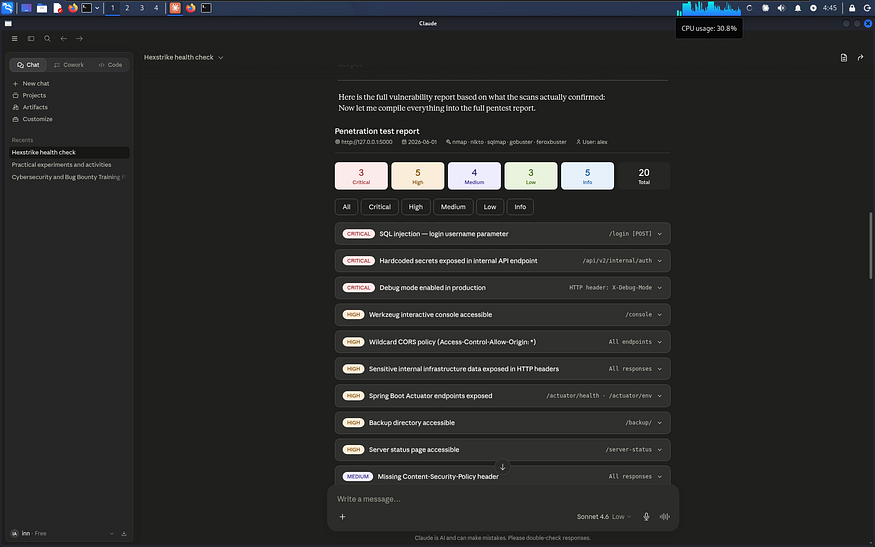
This creates an entirely new model for offensive security:
AI + Security Tools + Automation
HexStrike AI Architecture
A simplified workflow looks like this:
User Request
↓
Claude Code
↓
MCP Server
↓
HexStrike AI
↓
Security Tools
↓
Results & Analysis
The AI becomes an orchestration layer sitting above traditional security tooling.
Instead of manually selecting tools, AI can help coordinate workflows and interpret results.
Supported Security Operations
According to the project documentation, HexStrike AI integrates:
Reconnaissance
Examples:
- Asset discovery
- Subdomain enumeration
- DNS intelligence
Vulnerability Assessment
Examples:
- Automated scanning
- Exposure analysis
- Security checks
Network Analysis
Examples:
- Traffic inspection
- Service enumeration
- Infrastructure mapping
Security Reporting
Examples:
- Result summarization
- Workflow automation
- Research assistance
The project currently advertises support for more than 150 security tools.
Installing HexStrike AI
Step 1 — Clone the Repository
git clone https://github.com/0x4m4/hexstrike-ai.git
cd hexstrike-ai
Step 2 — Create Virtual Environment
python3 -m venv hexstrike-env
source hexstrike-env/bin/activate
Windows:
hexstrike-env\Scripts\activate
Step 3 — Install Dependencies
pip3 install -r requirements.txt
These installation steps are provided within the project’s setup documentation.
Starting the HexStrike MCP Server
Launch the MCP service:
python3 hexstrike_mcp.py
Or start the API server if required by your workflow:
python3 hexstrike_server.py
The platform typically runs locally and exposes MCP-compatible functionality for AI clients.
Setting Up MCP Servers in Claude Desktop
One of the most powerful features is connecting HexStrike AI directly to Claude.
Edit:
~/.config/Claude/claude_desktop_config.json
Add:
{
  "mcpServers": {
    "hexstrike-ai": {
      "command": "python3",
      "args": [
        "/path/to/hexstrike-ai/hexstrike_mcp.py",
        "--server",
        "http://localhost:8888"
      ]
    }
  }
}
This configuration is documented by HexStrike AI for Claude Desktop integration.
Setting Up HexStrike AI in Claude Code
Claude Code supports MCP server registration directly.
Example:
claude mcp add --transport stdio 0x4m4-hexstrike-ai python hexstrike_server.py
After adding the MCP server:
claude mcp list
Verify that HexStrike appears in the active server list.
Example MCP installation methods are documented across MCP directories and Claude Code integration guides.
Setting Up MCP Servers in VS Code
VS Code can also connect to HexStrike AI.
Example configuration:
{
  "servers": {
    "hexstrike": {
      "type": "stdio",
      "command": "python3",
      "args": [
        "/path/to/hexstrike-ai/hexstrike_mcp.py",
        "--server",
        "http://localhost:8888"
      ]
    }
  }
}
VS Code integration examples are included in the project documentation.
Example Workflow
Imagine asking Claude:
Enumerate subdomains for target.com
Run vulnerability assessment
Analyze findings
Generate report
Instead of manually launching multiple tools, the AI can coordinate the workflow through MCP-connected tooling.
This is one reason many researchers view MCP-based security automation as the next major evolution in offensive security operations.
Why This Matters for Bug Bounty Hunters
Traditional bug bounty workflows involve:
- Manual recon
- Multiple terminals
- Constant context switching
HexStrike AI aims to reduce that overhead by providing:
- AI-assisted decision making
- Workflow orchestration
- Faster recon pipelines
- Automated reporting
The result is:
More time analyzing vulnerabilities and less time managing tools.
Security Risks of AI Pentesting
There is also a serious security discussion happening around AI-powered offensive tools.
Researchers have noted that MCP servers often execute with significant host access and can introduce new attack surfaces if not properly secured.
Security considerations include:
- Tool permissions
- Local execution risks
- API key management
- Sensitive data exposure
- Autonomous command execution
Always isolate testing environments and use proper authorization.
The Future of AI-Powered Penetration Testing
The cybersecurity industry is moving toward:
- AI-assisted reconnaissance
- Autonomous vulnerability discovery
- Multi-agent workflows
- Continuous attack surface monitoring
- Automated reporting
Projects like HexStrike AI demonstrate how AI agents are evolving beyond simple chat interfaces into operational security assistants.
The future may look like:
Researcher → AI Agent → MCP Server → Security Toolchain
Instead of manually orchestrating dozens of tools, the AI coordinates the workflow while the human focuses on strategy and validation.
Final Thoughts
HexStrike AI is one of the most ambitious examples of AI-driven offensive security automation currently available.
By combining:
- Claude Code
- MCP Servers
- Security Tooling
- AI Agents
it creates a glimpse into what penetration testing may look like over the next few years.
The goal is not replacing security researchers.
The goal is amplifying them.
As MCP ecosystems continue growing, AI-assisted cybersecurity workflows will likely become a standard part of:
- Bug bounty hunting
- Red teaming
- Security assessments
- Vulnerability research
The future of penetration testing is no longer just about tools.
It’s about intelligent orchestration.
And projects like HexStrike AI are pushing that future forward.
Leave a Reply